Reolink · Frigate · ZoneMinder · QNAP QVR · UniFi Protect

Every camera you have, on one wall

Kestrel is a camera client for the systems you already run — a Linux desktop app, a Roku channel, and a Roku screensaver, built from one codebase and one design. Add as many NVRs as you own, from as many makers, and they share a single grid. It talks straight to each one over your own network: no cloud account, no third-party servers, nothing leaving your home.

Local network only · No cloud account · Independent — not affiliated with any camera maker

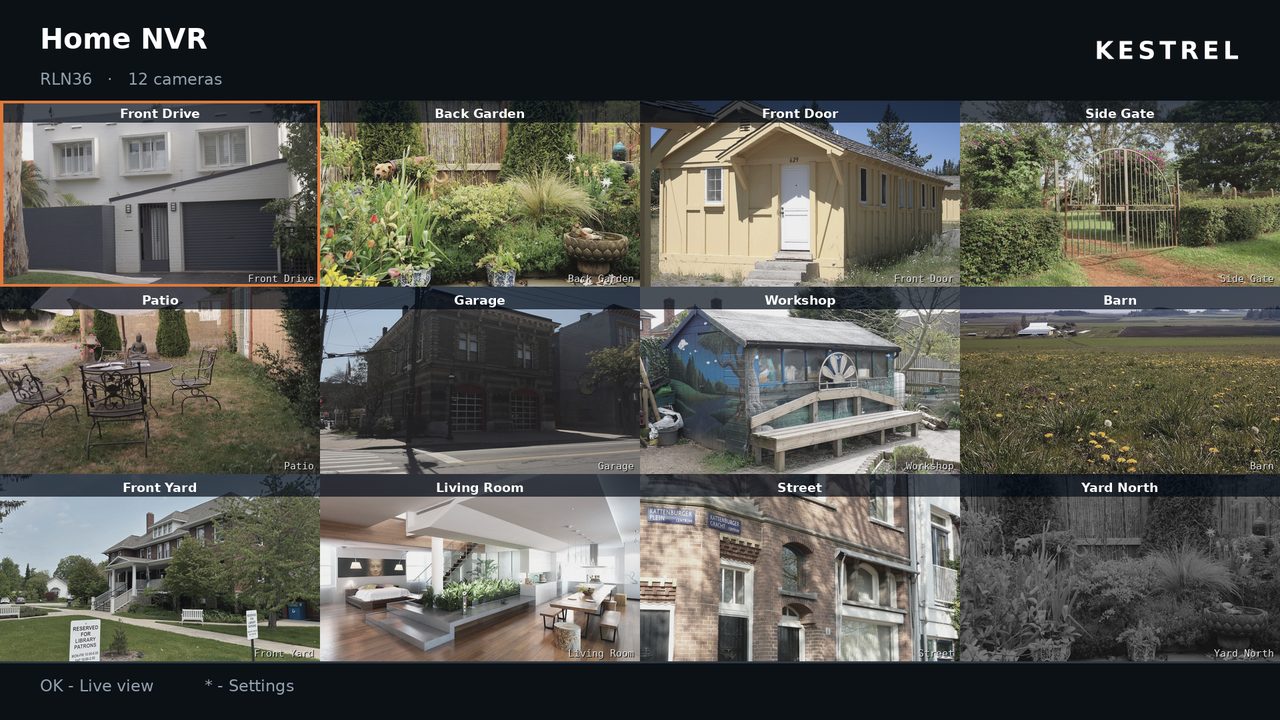
The Kestrel camera wall on a TV: a weather strip across the top reading 71°F and overcast, with readings in two columns and the date and time at the right; ten camera tiles from two devices below it, each captioned with its device and camera name and one highlighted in copper; and two forecast tiles in the cells the cameras leave spare.

Two devices on one wall, each tile captioned with the system it came from — and, on the Roku channel, the weather above it. Camera imagery is stand-in stock footage, not real cameras.

Systems

Five systems, one wall

Kestrel speaks each system's own local API. Pick yours when you add a device — or press Identify this system and let Kestrel ask the address what it is running.

Verified on real hardware

Reolink

NVRs and standalone cameras. The system Kestrel was built against and is developed on daily — an RLN36 with 36 channels. Everything works here: live view, recorded playback, PTZ and presets, infrared and spotlights, and motion and AI detection.

Partly run on real hardware

UniFi Protect

The Roku channel has been run against a real Protect controller with a local account: it logs in, reads the bootstrap, lists the cameras and draws them on the wall. That much is watched rather than assumed.

The rest is not. The defects that run turned up are fixed but have not been back on hardware, full-screen live view and detection have never run, and the Linux client's own UniFi support has never met a controller at all.

Written to the published API

Frigate · ZoneMinder · QNAP QVR

Each implemented from its documented API, with live view and — where the system offers one — a detection feed. Kestrel asks each system what it can do and offers only that, so controls a system does not support never appear.

None of these three has been run against real hardware yet — see below.

What "written to the published API" means

Reolink support is verified continuously against a real NVR. UniFi Protect has been run far enough to draw a wall, on the Roku side, and the parts past that are listed as unproven rather than counted as working. Frigate, ZoneMinder and QNAP QVR were built from each project's published API documentation, and none was reachable from the network Kestrel is developed on — so they compile, they are covered by tests for the parts that are pure logic, and that is honestly all that is known about them.

They may work perfectly. They may fail on the first request. Both projects keep a public record of exactly what is unproven and what is most likely wrong in each, rather than letting it read as tested. If you run one of these systems, expect to be the first — and please tell us how it went at [email protected]. What makes such a report useful is here.

Three ways to watch, and one thing that helps

One product, on the screens you have

The desktop client and the TV clients share a palette, a wordmark and a way of working, so moving between them needs no relearning. The fourth piece is optional: an add-on that gives the TV real video instead of a sequence of stills.

Linux desktop · Free

Kestrel for Linux

The full client: every camera at once, playback of recorded footage, PTZ, snapshots and recording. A single AppImage — no system ffmpeg, GStreamer or VLC to install.

  • Paged grid of 1, 4, 6, 9 or 16 cameras
  • Every device you own in one grid
  • Hide the cameras you never want to see
  • Keep a zoomed-in framing as a camera of its own
  • Calendar playback with scrubbing and download
  • Motion and AI events with desktop notifications
  • Weather and radar beside the cameras
  • Passwords in your system keyring
About the desktop app

Roku channel · Paid

Kestrel for Roku

Your camera wall on the TV, driven entirely from the remote. Open any camera full screen, pan and tilt with the D-pad, and jump to saved presets. A one-time purchase on the Roku Channel Store.

  • Camera wall that expands when you stop pressing keys
  • Several NVRs merged into one grid
  • Follow motion — the TV shows whatever is happening
  • PTZ, presets, infrared and spotlight control
  • The weather and the radar in a strip above the wall
  • Optional full-motion video, with the HLS add-on
About the Roku channel

Roku screensaver · Free

Kestrel Screensaver

An idle TV becomes a wall of your cameras, tiled edge to edge and dimmed for a dark room. No settings of its own — it reads the ones you entered in the app, and it costs nothing on top of it.

  • Every camera at once, no interface over the top
  • Softly dimmed so it never lights the room
  • The weather and the overnight forecast above them
  • Set up once, in the Kestrel app
  • Installed from the Roku screensaver list
About the screensaver

Home Assistant add-on · Free

Kestrel HLS

Optional, and the answer to the one thing a Roku cannot do. It repackages your cameras' RTSP streams as HLS, so the channel shows full-motion video with sound rather than a sequence of stills. Pair it once and the channel registers its own cameras.

  • Real video on the TV, with sound
  • Cameras register themselves — nothing typed twice
  • Copies the stream rather than re-encoding it
  • Runs beside Home Assistant, on your own machine
  • The channel still works fully without it
About the add-on
Local by construction

Nothing leaves your network

This is not a policy decision that could be quietly reversed in an update — it is how the software is built. Kestrel has no servers, so there is nowhere for your video to go.

No account, ever

There is no Kestrel sign-up, licence key or login. You enter your own device's address and your own credentials, and that is the whole setup. Buying the Roku channel happens in your Roku account, where the store handles the entitlement — we never see it.

Direct to the device

Kestrel speaks each system's documented local API. It does not use any vendor's cloud relay — not Reolink's P2P, not a UniFi cloud account — which means it works only on your own network. The trade-off is deliberate. The weather is the one deliberate exception, off unless you switch it on: a public forecast needs a public service, and the policy names every address it uses.

No analytics, no telemetry

No usage reporting, no crash pings, no advertising frameworks. The Roku channel deliberately declines the marketing pixel Roku's static analysis suggests.

Credentials stay put

Each device's own credentials, kept per device. On Linux, passwords go to your system keyring over Secret Service. On Roku they go to the channel's private registry — which is not encrypted, and the app says so.

Your video is your video

Snapshots, recordings and downloads are written to a folder you choose. Nothing is uploaded, copied or indexed anywhere.

Open about what it can't do

The limitations below are on the front page rather than buried in a support article, because knowing them in advance is the difference between a useful tool and a disappointing one.

What it does

Built for watching, not configuring

Kestrel covers the parts of a camera client you reach for daily. Your device's own web UI keeps the parts you touch once a year.

Follow motion

One button puts the action on screen. Kestrel watches every camera and shows whichever ones are detecting something — several at once as a grid when more than one is active — then hands back to the normal view when everything goes quiet.

Each camera holds its place for a dwell period after it stops detecting, because detection flickers constantly during a real event and without dwell the layout would rebuild every few seconds. Twelve seconds by default, adjustable on both platforms.

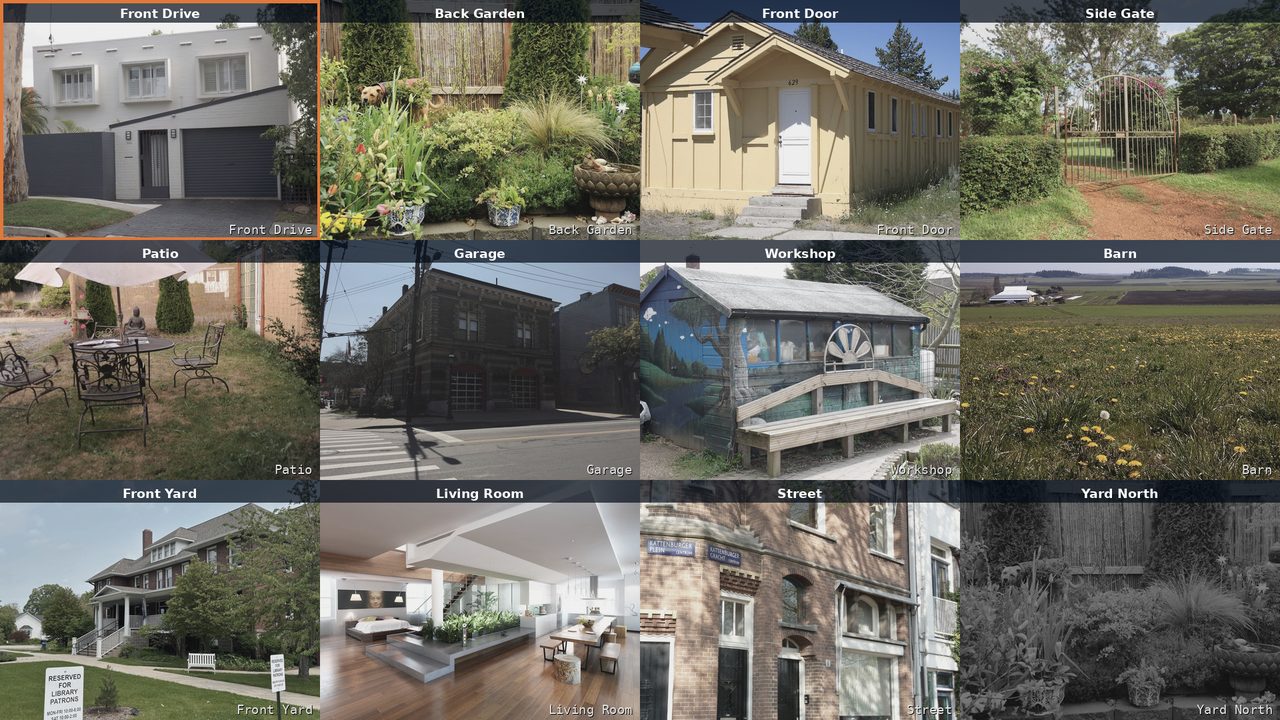
A single camera filling the screen in Kestrel's full-screen live view.

PTZ that only appears when it works

Hold a direction to pan and tilt, zoom and focus, and recall the presets stored on the camera itself. Presets are re-read from the device each time you select it, so they match what the camera actually has.

Controls are drawn from the capabilities the device reports, so a fixed camera never offers buttons that would only produce errors. Dual-lens cameras such as TrackMix appear as one camera, with the telephoto lens a zoom step away rather than a second entry.

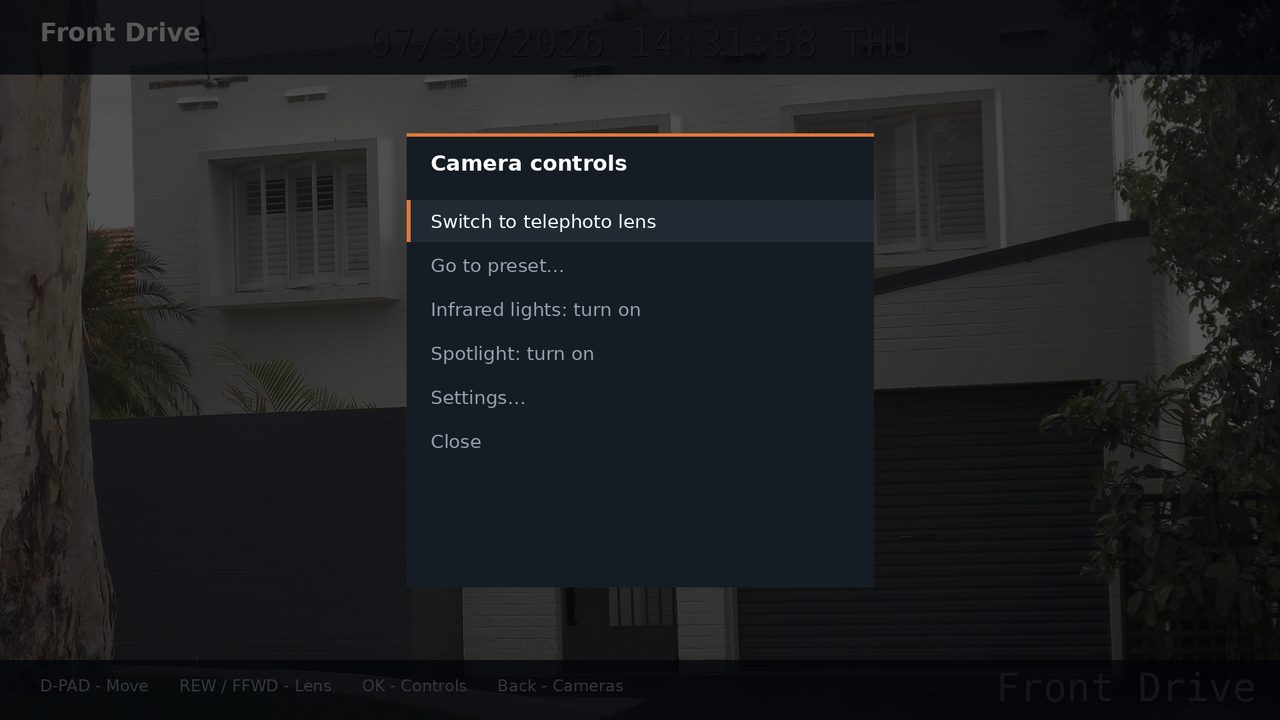
Kestrel's camera controls menu over a live camera view, listing presets and light controls.

Every device, one grid

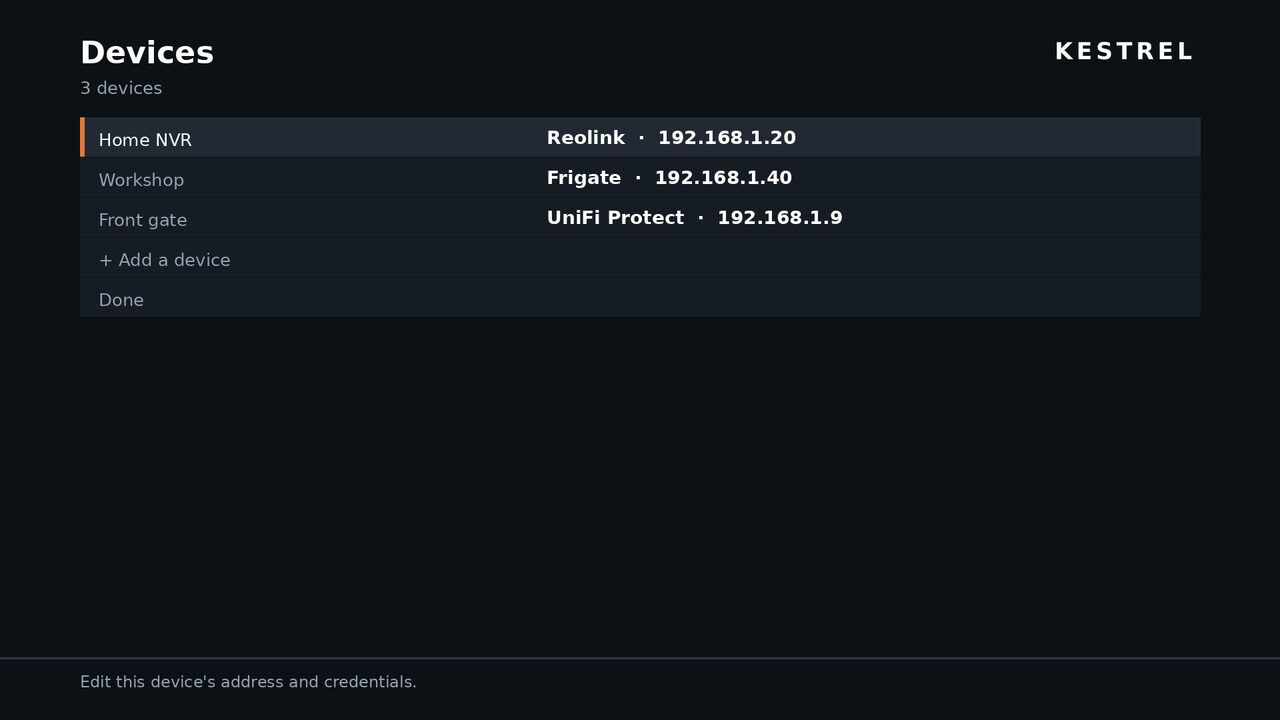
Point Kestrel at an NVR and every channel appears as its own tile. Add a second, from a different maker if you like, and its cameras join the same wall — sorted by device, each tile captioned with where it came from, so a wall of thirty cameras from three systems still reads at a glance.

Each device keeps its own session and its own workers, so they refresh side by side rather than in turn, and one device going quiet does not take the others with it. Channels a device reports as offline — usually unpopulated NVR slots — are hidden by default, so an eight-channel box with four cameras does not show four dead tiles.

An input pointed at something you never need to look at is a different problem, and both clients now let you hide any camera outright: from a tile's menu or the sidebar on Linux, from Cameras… in Settings on Roku. A hidden camera is not drawn and not fetched, so it stops costing the NVR anything, and it stays hidden across paging, follow motion and the screensaver alike. Hiding is stored with the device rather than as a preference, because it describes the hardware rather than a way of looking at it.

Kestrel's devices list showing three entries: Home NVR on Reolink, Workshop on Frigate, and Front gate on UniFi Protect, each with its address.

It can work out what you have

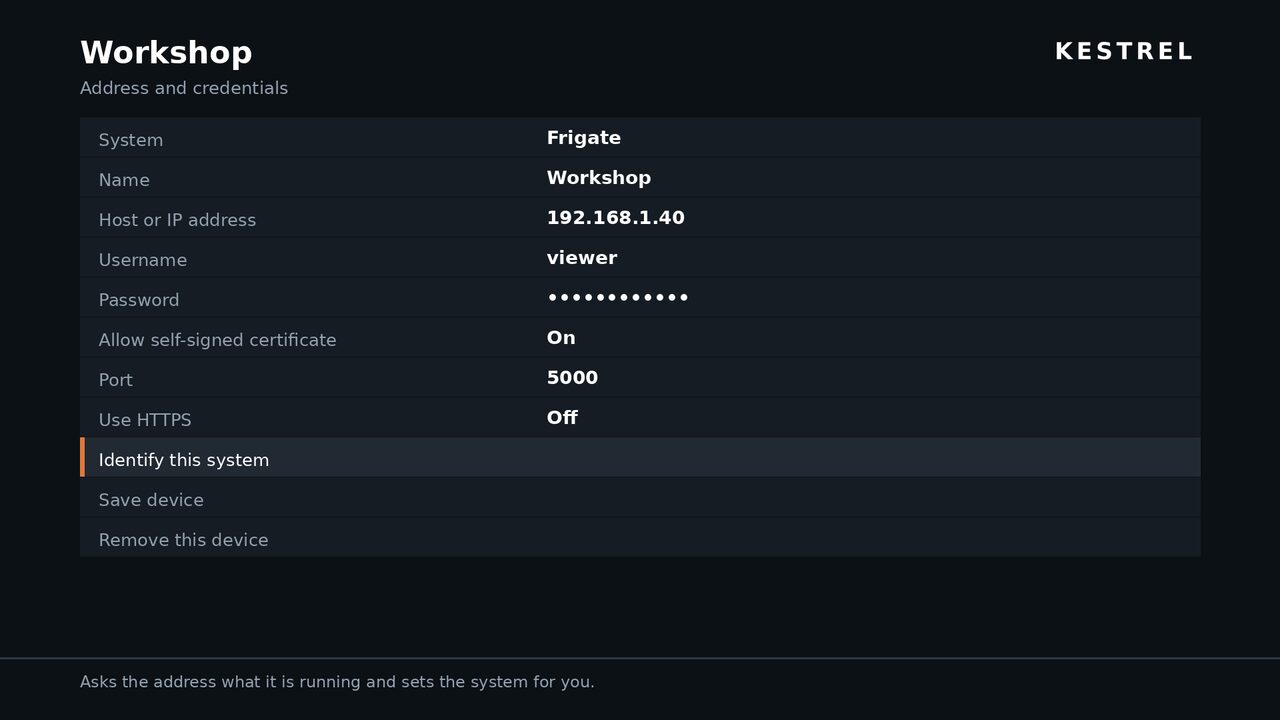
Adding a device asks for an address, a username and a password. If you are not sure what the box at that address is running, Identify this system asks it directly and fills the answer in.

Each system gives itself away without needing credentials: Frigate returns a bare version string, UniFi Protect a refusal from a path only it serves, ZoneMinder its version, QNAP its XML document root, and Reolink a JSON rejection with a code in it. Picking a system also moves the port to where that system listens, without overwriting one you typed yourself.

Each probe looks for something structural rather than merely a reply, because a confidently wrong guess would be worse than none — and a wrong guess is cheap, since you can always pick the system by hand.

Kestrel's device form: System set to Frigate, a name, host, username, password, port, and an Identify this system action described as asking the address what it is running.

The weather and the radar, above the cameras

A ZIP code is all Kestrel needs: the National Weather Service's conditions and forecast in a strip across the top of the wall — temperature and conditions large enough to read from the far side of the room, then feels-like, humidity, wind and pressure as the line allows — with the forecast in whatever cells the cameras leave spare, so nothing is displaced to make room for it. If you run WeeWX, it will read your own station instead, and nothing downstream can tell the difference.

The radar comes with it: the last twenty minutes of the Enhanced Radar as a loop, on a screen of its own and optionally in a cell among the cameras. Any watch or warning out runs along the strip in full. The screensaver carries all of it, which turns an idle TV into something worth glancing at on the way past.

On both apps now. The desktop client carries the same two sources, the same radar and the same forecast tiles — a strip above the grid, a Weather tab beside Live and Playback with the forecast period by period, the forecast itself in whatever cells the cameras leave spare, and the radar optionally taking one too — a real map you can drag, zoom and scrub through, not a picture of one. Where the TV waits for a spare cell, the desktop can also be told to keep cells for the forecast whatever the camera count. Honestly reported, as ever: both were run against the live services, and the desktop's layout was checked on screen, but the Roku wall has still not been rendered on an actual television. What has not been run on the TV is here, and the desktop's weather is here.

The weather strip on its own: a cloud glyph, 71°F and Overcast in copper on the left; Feels like 73.8°F, Humidity 88%, Wind 4 mph NE, Today 78°/68°, Rain 0.12 in and Pressure 29.94 inHg in two columns, with tonight's forecast under them; and the Kestrel wordmark over the date and time on the right.
How it works

Three things, then you are watching

  1. Install the client Download the AppImage for Linux, or install Kestrel from the Roku Channel Store on your TV. Neither needs root, a package manager or a build step.
  2. Point it at your device Enter the address of your NVR or camera on your LAN, with a username and password. Both clients check the details against the device before saving.
  3. That's it Every channel the device reports appears as a tile. Settings persist, and the Roku screensaver picks up the same details automatically.

Use a dedicated camera account

Create a non-admin user for Kestrel on each system rather than reusing admin. Per-user permissions are coarse on most of these systems, but a limited account still limits the damage if the credentials get out. PTZ and light controls do need an account with control rights. On UniFi Protect it has to be a local account — a cloud one needs two-factor, which a TV cannot complete.

Before you install

What Kestrel does not do

Worth knowing in advance. None of these are on a roadmap to be fixed shortly — most are fixed properties of the platforms involved. Things that are going wrong rather than missing by design are on the known issues page.

Three systems are unproven, and a fourth is only half proven

Reolink has been run against real hardware throughout. UniFi Protect has been run far enough on the Roku channel to log in and draw a wall, and no further — the fixes that run produced have not been back on hardware, and the Linux client's UniFi support has never met a controller. Frigate, ZoneMinder and QNAP QVR are built from published documentation and have never talked to an actual install. Buy on the strength of Reolink support; treat the rest as promising.

Playback and PTZ are Reolink-only

On the other four systems, Kestrel reports those capabilities as unavailable, so the control pane does not appear and the playback view says the system does not serve recordings rather than showing an empty calendar. That is a limit of what has been implemented, not of what those systems can do.

Local network only

Kestrel reaches your devices directly over their local APIs, so your Roku or PC must be on the same network. It cannot use a vendor's cloud relay — Reolink's P2P/UID is an undocumented proprietary protocol, and UniFi Protect needs a local account rather than a cloud one. Do not port-forward an NVR to the internet to work around this.

Everything to do with your cameras stays on that network. The weather is the one exception, and only if you switch it on — see below.

The weather goes out to the internet

On both apps it is off until you switch it on, and then it is the one part of Kestrel that contacts something you do not own: the National Weather Service, which needs a US ZIP code, or your own WeeWX server if you would rather keep it on the LAN. The radar reaches out either way. Every address is listed in the privacy policy.

None of the Roku weather layout has been rendered on an actual television yet — the data has been run against the live services and the geometry checked arithmetically, which is not the same thing. The desktop's has been looked at on screen. It is set out in full on the Roku page.

Roku live view is snapshots

Roku cannot play RTSP, RTMP or HTTP-FLV — the live formats these systems produce. On TV, live view is a rapid sequence of camera stills, with no audio, unless something converts the stream to HLS first.

Kestrel HLS is the first-party way to do that — a Home Assistant add-on the channel pairs with — and any restreamer you already run works too. Both are marked untested in the channel's settings: they have been run against real hardware, playback end to end has not been confirmed, and snapshots remain the supported way to watch on a TV today.

Events are polled, not pushed

These APIs have no push channel, so detections are sampled every couple of seconds. A detection shorter than the poll interval can be missed, and the event list starts empty each session because devices keep no queryable log.

Detection coverage varies by system: QNAP QVR reports nothing usable, because it exposes events only through a search API meant for looking back through recordings. ZoneMinder reports that an alarm is running but not what caused it, so everything from it counts as plain motion.

No two-way talk

Not implemented on either platform — and a Roku has no microphone input in any case.

No device configuration

Recording schedules, detection zones and network settings are left to your device's own web UI. Kestrel views and controls; it does not administer.

Some NVR firmware won't serve playback

A few firmware versions list recordings but return no file handle for them. Those clips are shown greyed out with their real times and sizes rather than failing silently when you press play.

Download

Get Kestrel

The desktop client is free and open source, as is the Home Assistant add-on. The Roku channel is a one-time purchase, with its screensaver included at no extra cost. No subscriptions, and no Kestrel account anywhere.

Linux desktop

Kestrel-x86_64.AppImage · Free · latest release

A single self-contained file. Make it executable and run it — ffmpeg ships inside, so there is nothing else to install and no root required.

Download AppImage

Roku channel

Kestrel · $14.99, one-time

Coming to the Roku Channel Store. Buy it once from the store on your TV or from your Roku account on the web, and it stays on every Roku on that account. No subscription.

Coming soon

Roku screensaver

Kestrel Screensaver · Free

Free, and a separate store entry — Roku does not allow an app to carry its own screensaver. Install it alongside the app, then pick it under Settings → Screen saver.

Coming soon

Home Assistant add-on

Kestrel HLS · Free, MIT

Optional, and only useful with the Roku channel: it turns the TV's snapshot view into real video. Installed as an add-on repository in Home Assistant. What it does, and what is unproven.

Coming soon

Running the AppImage

chmod +x Kestrel-0.1.0-x86_64.AppImage
./Kestrel-0.1.0-x86_64.AppImage

Requires a 64-bit x86 Linux desktop. Password storage uses your desktop's keyring over Secret Service; without one, Kestrel tells you where the password ended up instead.

FAQ

Questions worth asking first

Is Kestrel made by Reolink, Ubiquiti, or any of the others?

No. Kestrel is an independent project and is not affiliated with, endorsed by, or supported by Reolink, Ubiquiti, QNAP, or the ZoneMinder or Frigate projects. It talks to each system over that system's own documented API, and their names appear here only to say what Kestrel is compatible with. For help with Kestrel, contact us — not them.

Which systems does it work with?

Five: Reolink NVRs and cameras, Frigate, ZoneMinder 1.36 or newer, QNAP QVR Pro and Elite, and UniFi Protect with a local account.

Reolink is verified against real hardware — an RLN36 NVR, which is what development happens on. UniFi Protect has been run against a real controller from the Roku channel, far enough to log in, list the cameras and draw the wall, with everything past that still unproven. Frigate, ZoneMinder and QNAP QVR are implemented from published API documentation and have never been run against an actual install. All of this is described in full above.

Within a system, capability reporting varies by model and firmware: if a control you expect is missing, the device did not report supporting it. Battery-powered cameras that sleep show as offline until they wake.

Can I mix systems on one wall?

Yes — that is the point of it. Add a Reolink NVR, a Frigate instance and a UniFi Protect console and their cameras appear together in one grid, sorted by device, each tile captioned with the device it belongs to. Each device holds its own session and its own credentials, and refreshes independently of the others.

There is no configured limit on how many devices you add; the practical limit is how many camera tiles the screen and the hardware can usefully carry.

What happens if one of my devices is unreachable?

The wall comes up with whatever answered, and names what did not, rather than failing as a whole.

Being straight about it: on the Roku channel, partial failure is one of the paths that has not been exercised yet. Multi-device was tested by pointing two device entries at the same NVR — which proves the merged wall, the captions, the per-device workers and the keying, but cannot produce a genuinely unreachable second device. It is written down as unproven rather than claimed.

What is the weather doing in a camera app?

Taking up space nothing else was using. A camera wall is tiled into a square-ish grid, and unless your camera count divides into it neatly the last row ends short — five cameras leave one cell empty, seven leave two. Those cells now carry the forecast, and a strip across the top carries the conditions right now — and, if you want it, the radar takes a cell too.

There are two sources. By default Kestrel asks the National Weather Service for the ZIP code you gave it, which is also what the radar needs; that is US-only, and it is the one part of Kestrel that talks to something outside your network. Alternatively it reads a WeeWX server of your own — the JSON document WeeWX already publishes for Home Assistant — which works anywhere and keeps the request on your LAN. There is no account and no API key either way. Every address it contacts is listed in the privacy policy.

It is off until you switch it on, and it is on all three: the Roku channel, its screensaver, and the Linux client — where it appears as a strip above the camera grid and a Weather tab of its own. The full description is on the Roku page, including the honest part: that layout has been checked arithmetically rather than looked at on a screen. The desktop's is here, and has been.

Do I need to open ports on my router?

No — and please do not. Kestrel is designed to run on the same network as your cameras. Exposing an NVR's web interface to the internet is a well-established way to lose control of it. If you need access from outside, use a VPN back into your own network.

Why is the Roku picture not real video?

Because Roku's video player supports HLS, DASH, Smooth Streaming and progressive MP4, while these systems publish RTSP, RTMP, HTTP-FLV or MJPEG. There is no overlap, and no way to bridge it on the device itself. Kestrel polls each camera's snapshot endpoint instead, which needs no extra infrastructure and works the moment you connect.

Something has to convert the stream first. Kestrel HLS is the first-party way — a free Home Assistant add-on that the channel pairs with and registers its own cameras against — and if you already run go2rtc, MediaMTX or Frigate you can give the channel an HLS URL template instead. Either way you get real video with sound, a few seconds behind live.

Does Kestrel record continuously?

No. Your NVR or camera does the recording; Kestrel plays it back and can record the live stream on demand to a file. It is a viewer, not a recording system, and it does not need to be running for your cameras to record.

What does it cost?

The Linux desktop client is free and open source — licensed under the MIT and Apache 2.0 licences at your option, bundling ffmpeg under the LGPL as shared libraries.

Kestrel for Roku is $14.99, bought once on the Roku Channel Store. Kestrel Screensaver is free, and needs the app to be useful.

There is no subscription, no recurring charge and no in-app purchase. Buying it once covers every Roku on your Roku account, and there is still no Kestrel account to create. Payment, receipts and refunds are handled by Roku, under their terms and ours.

Is there a Windows or macOS build?

Not today. The desktop client is built and tested on Linux, and the Rust rewrite it now ships as makes other platforms plausible rather than promised. Most of these systems ship their own Windows and macOS clients, or have a web interface that works there.

Where do my credentials go?

On Linux, into your system keyring via Secret Service, with the config file as a documented fallback when no keyring is available — the About dialog tells you which is in use. On Roku, into the channel's private registry, in clear text, because the platform offers nothing better. Anyone with your Roku's developer password could read them. The privacy policy covers this in full.